Back
Announcements
Introducing Workspaces in Action Sync

Amarpreet Singh
As teams grow, information naturally spreads across more tools, more people, and more projects. Conversations move from Slack to email, documents live across drives, and critical decisions get buried in chats. What often gets lost is context. Who is working on what, where shared knowledge truly lives, and how collaboration stays structured without becoming fragmented or chaotic.
With this release, Action Sync introduces Workspaces, a foundational feature built to solve exactly this problem. Workspaces bring clarity, isolation, and collaboration together by giving teams a dedicated environment to operate in. All while still enabling seamless knowledge sharing. All of this comes together with enterprise-grade control. This ensures that teams can scale collaboration without compromising governance, security, or ownership.
What Are Workspaces?
Workspaces in Action Sync are isolated environments where teams can collaborate securely and efficiently. Each workspace represents a distinct team, function, or organization with its own members, connected apps, chats, and shared knowledge.
This isolation ensures:
Information stays relevant to the right team
Permissions and access remain clean and controlled
Teams can customize their setup without affecting others
Knowledge sharing happens within clear boundaries, reducing noise and duplication
Teams can scale independently without breaking workflows or governance
Workspaces also make it easy to share team-wide information (such as internal wikis or shared documents) by connecting apps and making them available to everyone through the Sources Hub.
Over time, we’ll be rolling out additional workspace-focused features to further enhance knowledge sharing, collaboration, and governance.

The New Workspace Dashboard
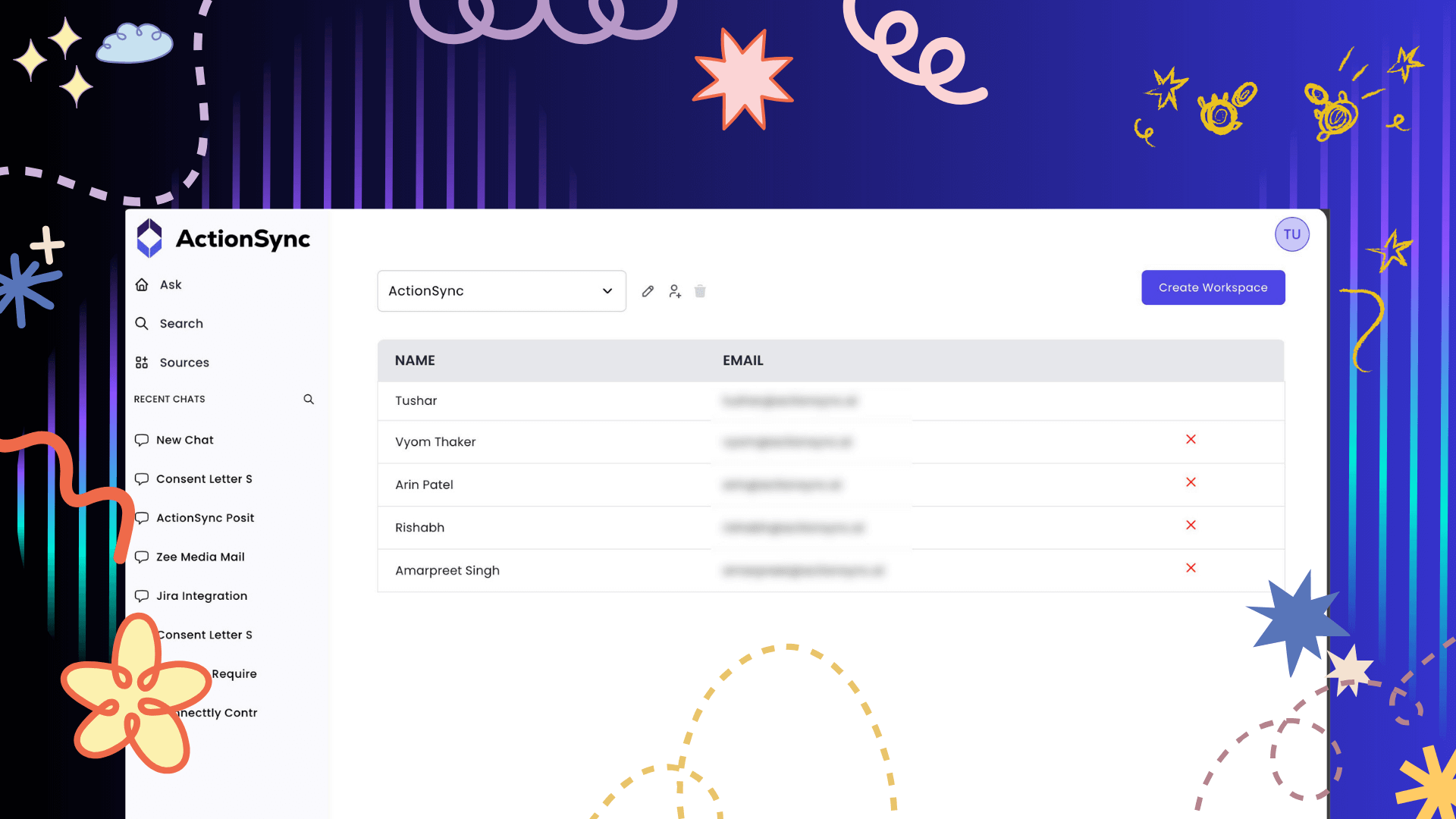
To make managing multiple teams effortless, we’ve launched an all-new Workspace Dashboard. It is designed to give teams a clear, centralized view of all their workspaces while simplifying everyday management and navigation.
What You Can Do from the Dashboard?
View and manage all your workspaces in one place
Switch between workspaces instantly. Yes, your connected apps and chats automatically follow the active workspace
Connect different apps per workspace based on that team’s needs
Join multiple workspaces across both SaaS and Enterprise deployments
Clearly see workspace ownership and role-based access at a glance
Manage workspace-specific configurations without impacting other teams
Scale workspace operations smoothly as teams, tools, and use cases grow
Each workspace operates independently. This feature allows teams to tailor their setup without clutter or overlap. It means teams can configure apps, data sources, and collaboration flows that are specific to their goals, without worrying about creating noise for other teams.
As organizations grow and add more tools, projects, or departments, this independence ensures clarity is maintained. So every workspace stays focused, relevant, and easy to manage, even at scale.
User & Access Management
Workspace admins can:
Add or remove users directly from the dashboard
Automatically delete a user’s workspace data upon removal
To maintain data integrity, a workspace can be deleted only after all users are removed. Once the workspace is empty, the delete option becomes available to the admin.
Joining and Creating Workspaces
We’ve made joining workspaces flexible and scalable for teams of all sizes.
How Admins Can Add Users
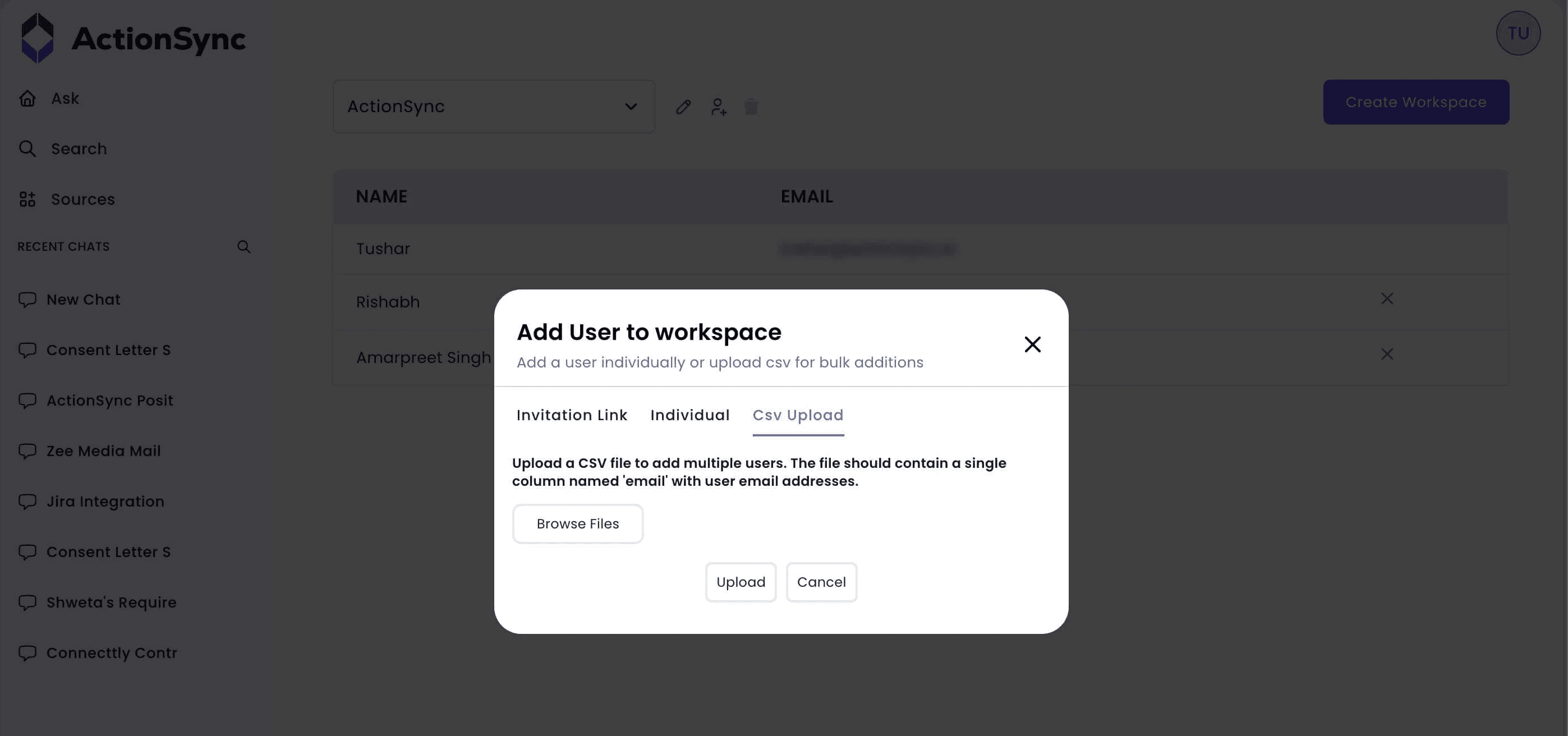
Workspace admins can invite users using multiple methods:
Share an invite link
Add users via email IDs
Upload a CSV to bulk add users
Selecting any of the above-mentioned ways removes friction and allows teams to onboard faster without manual coordination. By giving users visibility into available workspaces, Enterprise teams can reduce back-and-forth with admins. Thereby, accelerate access to the right knowledge environments, and ensure people land in the correct workspace from day one.
The result is faster ramp-up, fewer access bottlenecks, and a smoother experience as organizations scale across departments and teams.
Creating New Workspaces
Users can also create new workspaces directly from the Workspace Dashboard.
If the user already has an active subscription, the new workspace is added to that subscription
If not, Action Sync guides the user to create a new subscription seamlessly
This ensures teams can spin up new environments exactly when they need them. All without administrative delays or complex setup steps. Whether it’s a new project, department, or client, creating a workspace remains fast, intentional, and aligned with how your organization already operates.
Subscriptions: SaaS vs Enterprise
To align with different deployment needs, Action Sync subscriptions work differently for SaaS and Enterprise customers.
SaaS Subscriptions
For SaaS users:
Subscription cost is calculated based on the total number of users across all linked workspaces
Subscriptions can be purchased and managed directly within the app at:
/subscription-plans
This model works best for fast-growing teams where user count is the primary scaling factor.
Enterprise Subscriptions
For Enterprise customers:
Subscription cost is based only on the number of workspaces
Pricing is independent of the number of users within each workspace
A dedicated subscription payment page is shared, and licenses activate based on that purchase
This approach offers predictability, flexibility, and scale. Especially for large organizations with many users per team.
Conclusion
Workspaces are more than a structural update. They’re a meaningful step toward making Action Sync the system of intelligence for modern teams. They introduce a clear operating model for how knowledge, collaboration, and context come together across teams, tools, and workflows.
With isolated collaboration, flexible onboarding, and clear subscription models, teams can now scale knowledge sharing confidently. All without losing control, speed, or security. Whether you’re a growing startup or a large enterprise, Workspaces help ensure the right people have access to the right knowledge at the right time.
This release lays the foundation for deeper workspace-level intelligence, smarter automation, and richer collaboration features that will continue to evolve with how teams actually work. It’s not just about organizing information; it’s about enabling better decisions, faster execution, and shared clarity.
Welcome to a more organized, scalable, and intelligent way to work, with ActionSync.