Back
Work AI
What is Retrieval-Augmented Generation (RAG) in AI

Amarpreet Singh
Imagine asking your AI assistant a critical question about your company's Q3 pricing policy. The assistant gives you a confident, well-written answer. But then your finance team points out that the policy changed three months ago. The AI had no idea. It was working from outdated knowledge baked into its training data.
That gap between what an AI knows and what is actually true right now is one of the biggest challenges in enterprise AI. And it's exactly the problem that Retrieval-Augmented Generation (RAG) was built to solve.
RAG is not just a technical buzzword. It is the architecture powering the smartest, most reliable AI assistants in enterprise environments today. Whether you are a developer building intelligent tools, a business leader evaluating AI platforms, or simply someone trying to understand why some AI systems give better answers than others, RAG is a concept worth understanding deeply.
In this guide, we will break down everything you need to know about RAG. What it means, how it works step by step, why it matters for enterprise AI, where it excels, where it falls short, and what the future looks like. Let's dive in.
What Does RAG Actually Mean?
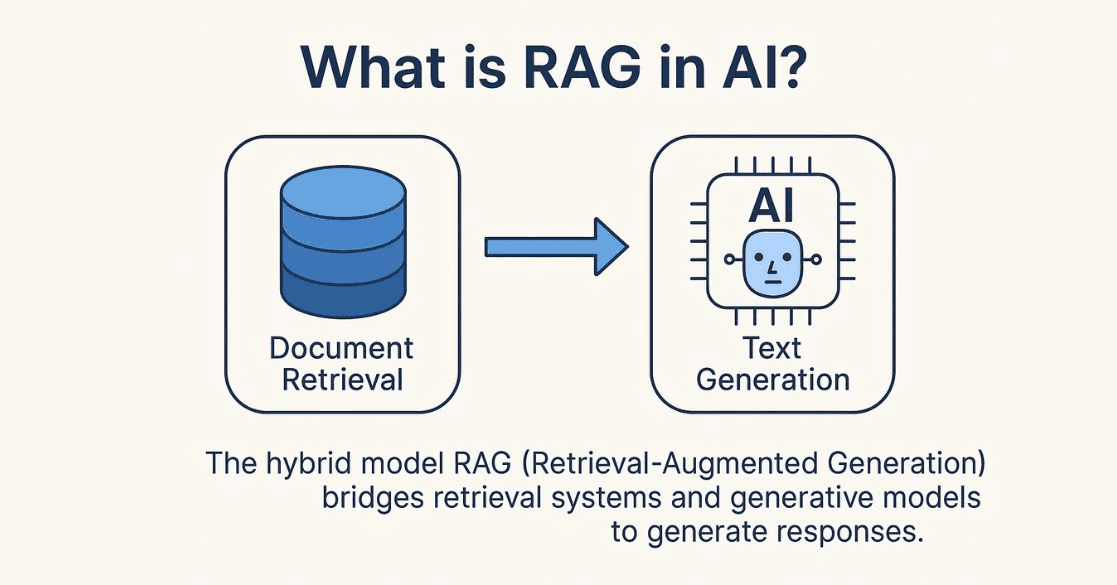
Retrieval-Augmented Generation is an AI framework that combines two things: a retrieval system and a generative language model.
Here is the plain English version.
When you ask a question, the system does not just rely on what the AI model memorized during training. Instead, it first goes out and retrieves relevant documents, data, or information from a connected knowledge source. Then it uses that retrieved information to generate an accurate, grounded answer.
Think of it like this.
A standard AI model is like a brilliant person who studied everything intensively for two years, then walked into an exam room. They know a lot. But they are working entirely from memory. If the question involves something that changed after their study period ended, they may get it wrong with full confidence.
A RAG-powered system is like that same person, but now they can bring reference books, notes, and documents into the exam room. Before answering, they look up the most relevant material and use it to inform their response. The answer is still generated by their intelligence, but it is grounded in actual, current information.
That combination of retrieval plus generation is what makes RAG so powerful.
The term was formally introduced in a 2020 research paper by Patrick Lewis and colleagues at Facebook AI Research (now Meta AI). Since then, it has become one of the most widely adopted architectures in enterprise AI development.
Enterprise AI assistants like ActionSync operationalize this by integrating directly with workplace tools, enabling AI to retrieve real-time context before generating responses.
Why RAG Exists? The Core Problem It Solves.
To understand why RAG matters, you need to understand the fundamental limitation of large language models (LLMs).
LLMs like GPT-4, Claude, and others are trained on massive datasets. This training process gives them broad knowledge across topics. But once training ends, their knowledge is frozen. These models have what is called a knowledge cutoff date. Anything that happens after that date? They simply do not know about it.
This creates three serious problems for enterprise use:
Problem 1: Stale Information
The world keeps changing. Products get updated. Policies shift. Regulations evolve. Pricing changes. New research emerges. An AI working from frozen training data will give outdated answers to questions that depend on current information.
For a consumer chatbot answering trivia questions, this might be acceptable. For an enterprise AI assistant helping employees make real decisions? Stale information is a real risk.
Problem 2: Hallucination
LLMs sometimes generate responses that sound authoritative but are factually wrong. This is called hallucination. It happens because the model is essentially pattern-matching and predicting the most plausible-sounding response based on its training, not retrieving a verified fact.
Hallucination is especially problematic in enterprise settings where accuracy is critical. A sales rep relying on a hallucinated contract term could cause serious damage. An HR professional using a hallucinated policy detail could create compliance issues.
Problem 3: No Access to Private Data
LLMs are trained on public internet data. They have zero knowledge of your company's internal documents, your proprietary processes, your customer data, or your product-specific knowledge. This makes them fundamentally limited as enterprise tools unless you give them access to that private information in a safe, controlled way.
RAG solves all three problems. It connects the AI to a live, curated knowledge source. That knowledge source can include your internal documents, your updated policies, your product documentation, and any other data you choose to include. The AI retrieves relevant content from that source at query time and uses it to generate a grounded, accurate response.
This is where enterprise search platforms such as ActionSync become critical—securely connecting AI to internal documents, tools, and workflows without exposing sensitive data.
How RAG Works: A Step-by-Step Breakdown
Understanding the mechanics of RAG is not as complicated as it sounds. The process follows a clear sequence. Let's walk through each stage.
Step 1: Building the Knowledge Base
Before RAG can retrieve anything, you need a knowledge base to retrieve from. This is sometimes called the corpus or the document store.
In an enterprise context, this might include:
Internal policy documents and handbooks
Product documentation and release notes
Customer support tickets and resolved cases
Meeting transcripts and project notes
Sales playbooks and pricing sheets
Research reports and market analysis
Knowledge base articles and FAQs
These documents are collected and prepared for indexing. Raw text is cleaned, organized, and sometimes split into smaller chunks. This chunking step matters a lot. Smaller, focused chunks are easier to retrieve accurately than large, multi-topic documents.
Step 2: Embedding Documents into Vectors
Here is where things get technically interesting. The system converts each text chunk into a vector embedding.
A vector embedding is a mathematical representation of text. It captures the meaning of the content, not just the exact words. Two sentences that say the same thing in different words will have similar vector representations. This is what makes semantic search possible.
All the vector embeddings are stored in a specialized database called a vector database. Popular vector databases include Pinecone, Weaviate, Chroma, and Qdrant. These databases are optimized to quickly search through millions of vectors and find the ones most similar to a given query.
Pro Tip: The quality of your embeddings directly affects the quality of your retrieval. Choosing the right embedding model for your domain (general purpose vs. domain-specific) can significantly improve how accurately the system finds relevant content.
Step 3: Receiving a User Query
A user types a question or prompt. For example: "What is our current refund policy for annual subscriptions?"
This query is also converted into a vector embedding using the same embedding model used for the documents. This allows the system to compare the query semantically against the document store.
Step 4: Semantic Retrieval
The system searches the vector database for chunks that are semantically similar to the query embedding. It ranks the results by relevance and selects the top few chunks.
This step is where RAG separates itself from old-school keyword search. Keyword search looks for exact word matches. Semantic retrieval looks for meaning matches. So even if your policy document says "money-back terms" and the user asked about "refund policy," the system can still find the right document because it understands that both phrases point to the same concept.
The number of chunks retrieved (often called the top-k) is a tunable parameter. Retrieving too few chunks risks missing relevant context. Retrieving too many can dilute the answer or exceed the model's context window.
Pro Tip: Many advanced RAG systems use a two-stage retrieval process. First, they cast a wide net using fast vector search. Then, they apply a re-ranker model to score and reorder the top results based on deeper relevance. This two-stage approach improves answer quality without sacrificing speed.
Step 5: Augmenting the Prompt
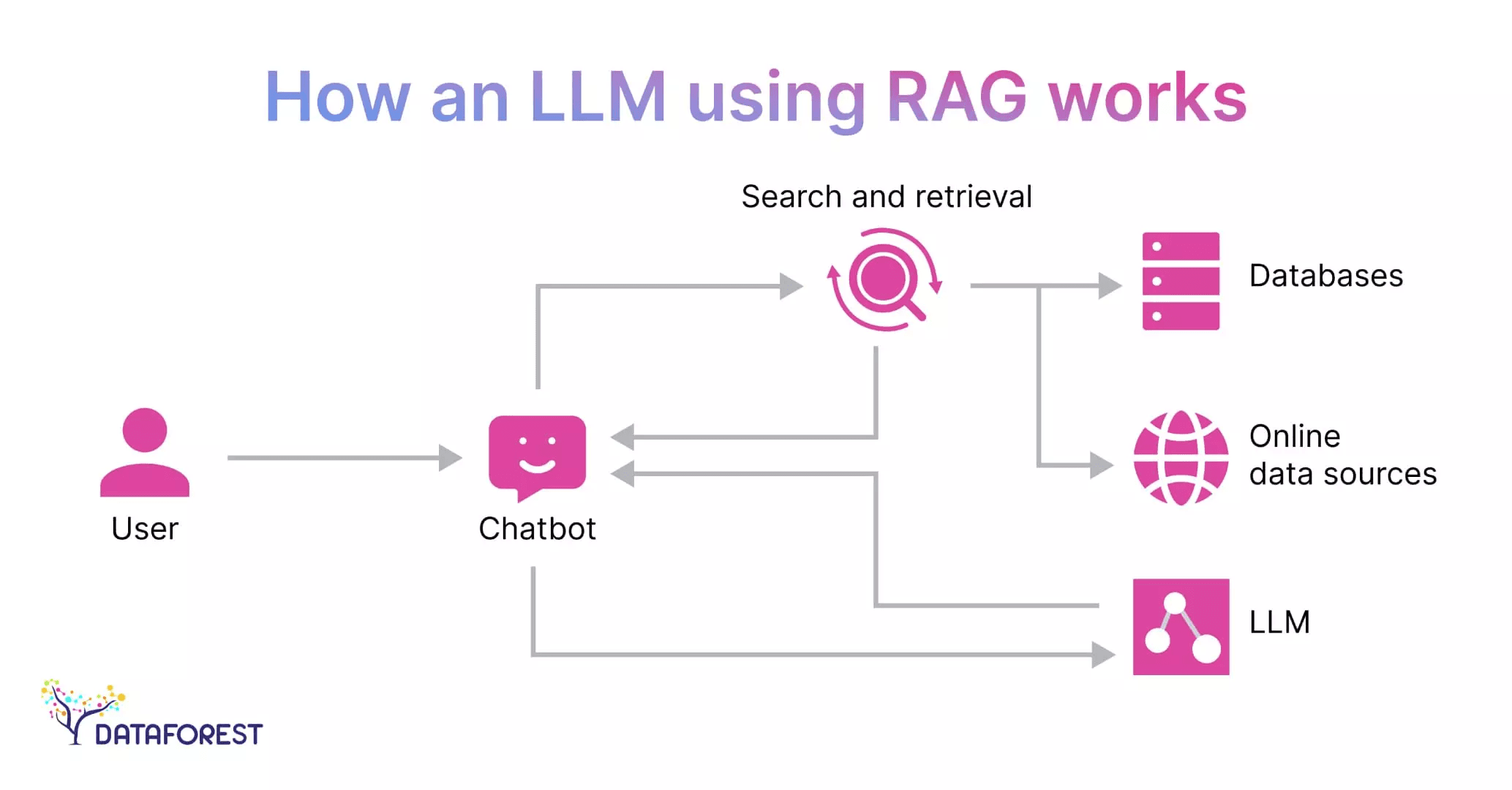
The retrieved document chunks are inserted into the prompt that gets sent to the language model. This is the "augmentation" in Retrieval-Augmented Generation.
The final prompt might look something like this:
"Use the following context to answer the user's question accurately. Context: [retrieved document chunks]. Question: What is our current refund policy for annual subscriptions?"
The language model now has two inputs: its own trained knowledge AND the retrieved, relevant context. It uses both to generate the response.
Step 6: Generating the Answer
The language model reads the augmented prompt, processes the retrieved context, and generates a response. Because the context is grounded in your actual documents, the answer reflects what your documents actually say, not what the AI guessed.
Many enterprise RAG systems also include source citations in the response. The AI will say something like:
"According to the Subscription Terms document (updated March 2026), annual subscribers are eligible for a full refund within 14 days of renewal."
This allows users to verify the answer directly.
In systems like Action Sync, this process is optimized with real-time retrieval, structured context building, and source-level traceability to ensure enterprise-grade accuracy.
So, at a high level, this entire flow is what makes RAG fundamentally different from traditional AI systems. It does not rely on static memory; it actively connects to knowledge, filters what matters, and grounds its response in real, retrievable context.
Once you understand this loop of retrieve → augment → generate, you understand the core engine behind modern enterprise AI systems.
The Anatomy of a RAG Pipeline
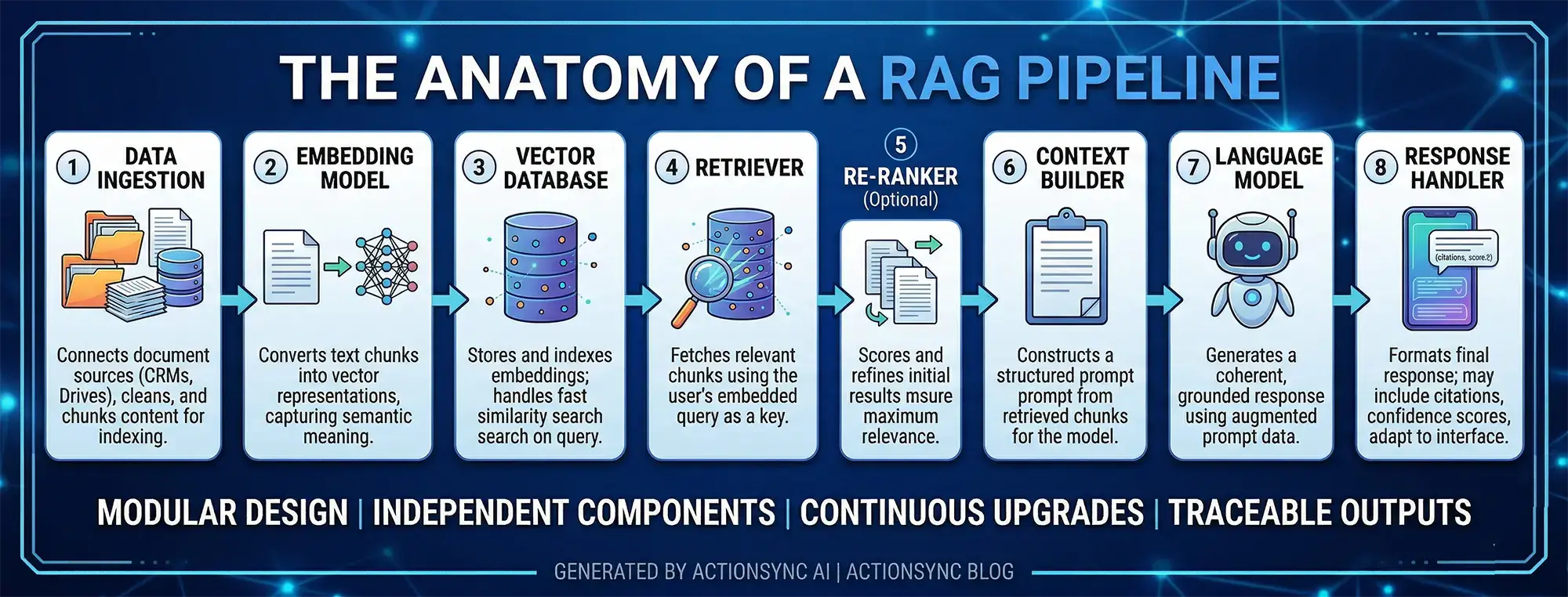
To visualize the full architecture, here are the core components of a production RAG system:
1. Data Ingestion Layer Connects to document sources, cleans and chunks the content, and prepares it for indexing. This layer often includes connectors to tools like Google Drive, Slack, CRMs, and internal databases, ensuring data flows in consistently and stays updated over time.
2. Embedding Model Converts text chunks into vector representations. The choice of embedding model affects retrieval quality significantly, as better semantic understanding leads to more accurate matches during search.
3. Vector Database Stores and indexes all embeddings. Handles similarity search at query time, typically using optimized nearest neighbor algorithms to ensure fast and scalable retrieval even across millions of data points.
4. Retriever Takes the user query, embeds it, and fetches the most relevant chunks from the vector database. It acts as the bridge between user intent and stored knowledge, making retrieval precision critical to overall system performance.
5. Re-ranker (Optional but Recommended) Applies a second layer of relevance scoring to improve the quality of retrieved chunks before passing them to the generator. This step refines initial results and ensures that only the most contextually useful information is used.
6. Context Builder Assembles the retrieved chunks into a structured prompt for the language model. It may also prioritize, truncate, or organize content to fit within context limits while preserving maximum relevance.
7. Language Model (Generator) Receives the augmented prompt and generates a coherent, contextually grounded response. It synthesizes retrieved information with its own reasoning capabilities to produce answers that are both accurate and well-articulated.
8. Response Handler Formats the final response for the user. May include citations, confidence scores, or follow-up suggestions, and can also adapt output formats based on the interface (chat, dashboard, API, etc.).
Each of these components can be tuned, swapped, or upgraded independently. This modularity is one of RAG's practical advantages. You can improve retrieval without changing your generator, or upgrade your language model without rebuilding your data pipeline.
Enterprise assistant AI platforms such as Action Sync abstract this entire pipeline into a unified layer, allowing teams to leverage RAG without managing each component manually.
Different Types of RAG Architectures
Not all RAG systems are built the same. As the field has matured, several architectural patterns have emerged.
Naive RAG
The simplest form. Query goes in, chunks are retrieved, prompt is assembled, answer is generated. No fancy orchestration. Works well for straightforward question-answering on well-organized document sets.
Best for: Getting started quickly, simple knowledge base Q&A, prototyping.
Advanced RAG
Adds more sophisticated components around the retrieval step. This might include query rewriting (reformulating the user's query to improve retrieval), hybrid search (combining vector search with keyword search), re-ranking, and metadata filtering.
Best for: Production enterprise deployments where accuracy and reliability are critical.
Modular RAG
A highly flexible architecture where each component (retriever, re-ranker, generator) can be independently swapped, upgraded, or specialized. Different retrieval strategies can be combined. Multiple document stores can be queried. The system can route different question types to different retrieval pipelines.
Best for: Large-scale enterprise systems with complex, heterogeneous knowledge sources.
Multimodal RAG
Current RAG systems primarily retrieve text. Multimodal RAG extends this to images, charts, diagrams, PDFs with visual layouts, audio transcripts, and video content.
Best for: Enterprise environments where knowledge lives across diverse formats. This is a significant expansion of capability.
Agentic RAG
The most advanced pattern. Here, the RAG system is embedded within an AI agent that can decide when to retrieve, what to retrieve, how to use the retrieved information, and whether to take actions based on the answer. The agent can also chain multiple retrieval steps to answer complex multi-part questions.
For example, an agentic RAG system might answer a question like: "Which of our enterprise customers used Feature X in Q3 and also submitted support tickets in Q4?" This requires pulling from the product usage database, the CRM, and the support ticket system, combining those results, and then generating a coherent answer. A single retrieval step cannot do that. An agentic loop can.
Best for: Complex enterprise workflows, multi-step reasoning, automated decision support.

Real-World RAG Examples in Enterprise Settings
RAG is not an academic concept. It is already powering real tools inside organizations across industries. Here are some concrete examples.
Example 1: HR Knowledge Assistant
A company with 2,000 employees uses a RAG-powered assistant to help employees find HR information. Employees can ask questions like:
"How many sick days do I get per year?"
"What is the process for requesting parental leave?"
"Does the health insurance cover dental procedures?"
The assistant retrieves the relevant sections from the HR handbook, benefits guide, and policy documents and generates a clear, accurate answer. HR teams report a significant drop in repetitive policy-related queries.
Pro Tip: When building HR or policy assistants, always include the document last updated date in your metadata. Surface this date in the response so employees know whether the policy they are reading reflects the latest version. Trust matters.
Example 2: Customer Support Intelligence
A SaaS company uses RAG to power its internal support agent tool. When a customer submits a ticket, the system retrieves similar resolved tickets, relevant product documentation, and known bug reports. It surfaces the most likely solution to the support agent, reducing average resolution time dramatically.
The key here is that the retrieval is pulling from a live, continuously updated knowledge base. New bug fixes, new documentation, and new resolved cases are added to the vector store regularly. The AI always has access to the latest knowledge.
Example 3: Sales Enablement Assistant
A sales team uses a RAG assistant to answer deal-specific questions during customer negotiations. A sales rep can ask: "What is our data residency policy for customers in Germany?" and get an accurate, cited answer from the legal and compliance documentation within seconds.
This reduces the back-and-forth between sales reps and legal teams and helps close deals faster. More importantly, it ensures sales reps are always giving customers accurate information.
This is a common pattern seen in platforms like Action Sync, where cross-functional teams access unified knowledge across tools in real time.
Example 4: Engineering Knowledge Base
A product engineering team uses RAG to surface answers from technical documentation, past architecture decision records (ADRs), and internal RFCs. Developers can ask questions like: "Why did we choose PostgreSQL over MongoDB for the user events table?" and get answers grounded in the team's own historical decision documents.
This is institutional memory at scale. New engineers can onboard faster. Senior engineers spend less time explaining decisions that were already documented.
Example 5: Financial Research Assistant
An investment firm uses RAG to help analysts query across thousands of research reports, earnings transcripts, and market data summaries. Instead of manually reading through 40 documents, an analyst asks a specific question and gets a synthesized answer with citations back to the source documents. Diligence work that used to take days can now be done in hours.
Furthermore, here are a few enterprise AI assistant examples that you should definitely check out.
RAG in the Context of Enterprise AI Assistants
This is where RAG becomes particularly relevant for companies building or adopting enterprise AI platforms.
An enterprise AI assistant without RAG is a liability. It answers with confidence but lacks grounding in your organization's actual knowledge. It cannot tell you what your current pricing model is. It does not know your internal processes. It may confidently tell a customer something that is factually wrong about your product.
An enterprise AI assistant with RAG becomes a reliable colleague. It can answer questions grounded in your internal documentation. It can surface relevant context from past projects. It can keep its knowledge updated as your organization evolves.
For platforms like ActionSync, RAG is not an add-on feature. It is the architectural foundation that makes enterprise knowledge retrieval accurate, trustworthy, and scalable. When employees ask questions across connected workplace tools like Slack, Google Drive, Notion, or internal wikis, the system does not guess. It retrieves. Then it generates. That distinction matters enormously in a business context where accuracy is not optional.
Pro Tip: When evaluating enterprise AI platforms, always ask whether answers are grounded in retrieved context or generated purely from model weights. Ask whether the system can cite sources. Ask how frequently the knowledge base is updated. These three questions will tell you a lot about how reliable the system will be in practice.

Benefits of RAG for Enterprises
Let's consolidate the core business value that RAG delivers.
1. Accuracy and Trustworthiness
RAG grounds AI responses in real documents. This reduces hallucination and ensures that answers reflect your actual organizational knowledge. Employees can trust the answers they get.
2. Always-Current Knowledge
Unlike fine-tuned models, RAG systems can be updated by simply adding new documents to the knowledge base. Your AI assistant learns about a policy change the moment that policy document is added. No retraining. No downtime.
3. Source Transparency
RAG systems can point to the exact document that informed the answer. This is powerful for enterprise compliance, audit, and governance purposes. You can always show where an answer came from.
4. Privacy and Control
Your retrieval layer sits inside your infrastructure. Your documents never need to leave your environment. The LLM only sees the specific chunks that are retrieved for a given query, not your entire document store. This is a meaningful privacy advantage.
5. Scalability
You can expand the knowledge base continuously. Add new documents, integrate new data sources, support new departments. The system scales with your organization's knowledge without expensive retraining cycles.
6. Cost Efficiency
Compared to fine-tuning large models on proprietary data, RAG is significantly more cost-efficient. You pay for the retrieval infrastructure and the API calls. You do not pay for expensive GPU compute to retrain billion-parameter models every time your documentation changes.
Limitations and Challenges of RAG
RAG is powerful, but it is not perfect. It helps to understand where RAG struggles so you can design around those weaknesses.
1. Retrieval Quality Determines Answer Quality
If your retrieval step surfaces the wrong chunks, the language model will generate a wrong answer confidently. This is called a retrieval failure. The better your embedding model, your chunking strategy, and your re-ranking logic, the lower this risk. But it requires real engineering effort.
2. Chunking Is Harder Than It Looks
Splitting documents into chunks sounds simple. It is not. Chunk too small and you lose context. Chunk too large and your retrieval becomes imprecise. Documents with complex structure (tables, code blocks, multi-part policies) require custom chunking logic.
3. Knowledge Base Quality Matters Enormously
RAG is only as good as the documents you feed it. Outdated documents, contradictory policies, poorly written wikis, and incomplete documentation will all degrade answer quality. Garbage in, garbage out. This means investing in knowledge hygiene is a prerequisite for effective RAG deployment.
4. Multi-Hop Reasoning Is Still Hard
Some questions require reasoning across multiple documents in sequence. Standard RAG pipelines handle this poorly. Agentic RAG helps, but adds architectural complexity and latency.
5. Latency Trade-Offs
Adding a retrieval step introduces latency compared to a pure generative response. For real-time conversational applications, this matters. Production systems need to optimize retrieval speed, often through caching, pre-fetching, or fast approximate nearest neighbor search algorithms.
6. Context Window Limits
Even the most powerful language models have a finite context window. If you retrieve many large chunks, you may exceed that window. Smart context management, summarization, and chunk prioritization are needed to handle this gracefully.
A useful way to think about these limitations is that RAG shifts the challenge from “teaching the model everything” to “ensuring the system can find the right information at the right time.” While this is a far more scalable and practical approach, it also means that success depends heavily on system design, data quality, and continuous optimization.
Organizations that treat RAG as a one-time setup often struggle, while those that treat it as an evolving system (continuously improving retrieval, refining data, and monitoring performance) are the ones that unlock its full potential.
Frequently Asked Questions or FAQs
Q. What is the difference between RAG and a standard LLM?
A standard LLM generates responses based entirely on patterns learned during training. It has no access to information beyond its training cutoff and no access to private or proprietary data.
A RAG-powered system augments the LLM with a retrieval step that pulls relevant documents from an external knowledge base at query time. This makes responses more accurate, more current, and grounded in real information rather than trained patterns.
Q. Does RAG eliminate hallucination completely?
No. RAG significantly reduces hallucination by grounding responses in retrieved context. But if the retrieval step fails to surface the right documents, the model may still generate inaccurate content. Good retrieval design, re-ranking, and knowledge base maintenance minimize this risk but do not eliminate it entirely.
Q. How often should you update a RAG knowledge base?
It depends on how frequently your source documents change. For fast-moving domains like product documentation or customer support, daily or real-time updates may be necessary.
For stable content like legal frameworks or foundational policies, weekly or monthly updates may be sufficient. The key is to match your update cadence to how quickly your knowledge becomes stale.
Q. Is RAG suitable for small companies, or is it only for large enterprises?
RAG scales in both directions. Small companies with even a few dozen internal documents can benefit from a RAG-powered assistant. The infrastructure costs have dropped significantly with the availability of managed vector databases and hosted embedding APIs. You do not need a large engineering team to build a basic RAG system today.
Q: What tools implement RAG in real-world enterprise environments?
Several enterprise AI platforms use RAG as a core architecture. For example, Action Sync AI connects across workplace tools to provide real-time, context-aware answers grounded in organizational knowledge.
Q. What types of documents work best with RAG?
Text-heavy documents with clear structure work best: policy documents, knowledge base articles, product guides, FAQs, meeting transcripts, and research reports. Documents with dense tables, complex formatting, or embedded images require additional preprocessing. Code-heavy documentation benefits from specialized code-aware embedding models.
Q. Can RAG be combined with fine-tuning?
Yes, and this is often the best approach for enterprise applications. Fine-tuning shapes how the model communicates (tone, format, domain-specific vocabulary).
RAG shapes what the model knows (factual content, proprietary information). Together, they deliver an AI system that is both behaviorally well-suited to your organization and factually grounded in your actual knowledge.
Conclusion
Retrieval-Augmented Generation is not just a clever technical design. It is the bridge between what AI models can do and what enterprise organizations actually need from AI.
The core insight behind RAG is simple but profound: AI should not have to guess when it can look something up. By connecting language model intelligence to a curated, current knowledge base, RAG makes AI answers trustworthy, verifiable, and genuinely useful in real work contexts.
For any organization thinking seriously about AI-powered knowledge management, customer support, employee productivity, or decision support, understanding RAG is not optional. It is foundational.
The best enterprise AI systems today are not just powerful language models. They are retrieval-first systems that know when to reach into your organization's knowledge before generating a response. That combination of retrieval and generation is what turns a generic AI assistant into something that actually knows your business.
And in a world where decisions move fast and accuracy matters, that difference is everything.
Want to see how RAG powers enterprise knowledge retrieval in practice?
👉 Book a free demo of ActionSync and explore how your team can access the right knowledge instantly, across all your connected tools.