Back
Work AI
How to Secure Enterprise Search in Your Organization

Tushar Dublish

Let's be honest. Most organizations deploy enterprise search and spend almost all their energy on relevance, speed, and integrations. Teams obsess over indexing quality, ranking algorithms, and seamless integrations across tools. Security, on the other hand, gets treated as a checkbox. A setting to configure once during setup and quietly forget as the system scales.
That's a serious mistake.
Because enterprise search is not just another internal tool. It becomes a central nervous system for your organization's knowledge. It determines who can discover what, how quickly, and with what level of visibility. When that system is loosely governed, the consequences are not limited to inefficiency—they extend directly into risk exposure.
Enterprise search doesn't just help employees find documents faster. It connects to your CRM, your Slack workspace, your HR system, your internal wikis, your financial records, and your project management tools. It pulls structured and unstructured data into a unified layer that feels simple on the surface but is deeply complex underneath.
In short, it touches everything sensitive across your organization. Customer data. Financial forecasts. Internal strategy documents. Legal contracts. Employee records. The very information your business depends on and must protect.
And when it is not locked down properly, it becomes one of the most dangerous exposure points in your entire tech stack. Not because it is inherently insecure, but because it amplifies every existing permission gap, every misconfiguration, and every overlooked access control decision. One weak link in a connected system does not stay isolated—it becomes searchable.
The good news? Securing enterprise search is not as complicated as it sounds. It does require discipline, a clear framework, and the right practices in place. This guide breaks down the most important ways to secure enterprise search in your organization, with real examples, pro tips, and practical steps you can act on today.
Why Enterprise Search Security Is Different?
Securing enterprise search is not the same as securing a database or an application. The threat model is fundamentally different, and treating it the same way leads to blind spots that most teams do not anticipate.
With a database, you control the perimeter. You define who gets in, what queries are allowed, and how data is accessed within a relatively contained system. With enterprise search, the whole point is to remove that perimeter. It aggregates data from every tool your teams use and puts it in front of every employee (remote or on-site) who might need it.
That is enormously useful. It reduces friction, eliminates silos, and accelerates decision-making across the organization. But it is also enormously risky if you are not deliberate about access, permissions, monitoring, and governance. Because once data is indexed and made searchable, it is no longer protected by the same contextual boundaries that existed in the source system.
In many ways, enterprise search does not just expose data—it reshapes how data can be discovered. It creates new pathways to information that did not exist before, combining signals across systems and surfacing results based on relevance rather than strict ownership boundaries.
Most breaches involving enterprise search are not technical attacks. They are access failures. The wrong person sees the wrong document because permissions were not enforced correctly, because access was never revoked after a role change, because connectors ignored source-level permissions, or because search results crossed boundaries they should not have.
These are not edge cases. They are systemic risks that emerge naturally when a system is designed to unify access without equally strong mechanisms to enforce limits. That is what makes enterprise search security both uniquely challenging and critically important.
12 Ways to Secure Enterprise Search in Your Organization [Updated 2026]
1. Enforce Role-Based Access Control at the Search Layer
Role-Based Access Control (RBAC) is the foundation of enterprise search security. Without it, your search system becomes a liability. With it, every employee sees only the results they are actually authorized to see.
RBAC in enterprise search works by grouping users into roles — Sales, HR, Engineering, Finance, Executive — and assigning each role specific data access permissions. When someone searches for a sensitive term, the system only surfaces results their role permits them to see.
This sounds simple. In practice, it is where most organizations fall short. They configure RBAC during initial setup and never touch it again. Roles go stale. People change teams but keep old access. New data sources get connected without proper access mapping.
Why This Matters: Without real-time, enforced RBAC at the search layer, a junior employee can potentially surface board-level documents. A contractor can access HR records. A departing employee can run one last search and walk away with confidential data.
Example: A 500-person fintech company discovered during a security review that 40% of employees could search and retrieve documents from the legal team's deal room. Their enterprise search tool indexed legal files without applying existing SharePoint permissions. Nobody caught it during setup because it was not tested.
Pro Tips to Implement This:
Map RBAC roles to your existing identity provider (IdP), not to search-specific groups
Apply permissions at the data source level, not at the result display level
Test access edge cases before launch: what can a new hire actually see?
Remove custom role exceptions unless explicitly approved and documented
2. Sync Permissions Dynamically, Not on a Schedule
Most enterprise search platforms offer two modes for syncing permissions: scheduled (every 24 hours or once a week) and real-time (synced continuously with the source system). Scheduled syncing feels simpler. It also creates a silent vulnerability window. That window is often invisible in day-to-day operations, which is exactly why it persists—until something goes wrong. What looks like a minor delay in synchronization is, in reality, a period where your access model is out of sync with reality.
If an employee resigns at 9 AM and their IdP access is revoked immediately, scheduled sync means their search access stays live for hours — or days. During that gap, they can still discover, search, and retrieve sensitive information that should already be off-limits. That is not a hypothetical risk. It is a common incident pattern observed across organizations of all sizes. In many cases, these windows are only identified after an incident review, when logs reveal that access persisted far longer than expected—long enough to cause material damage.
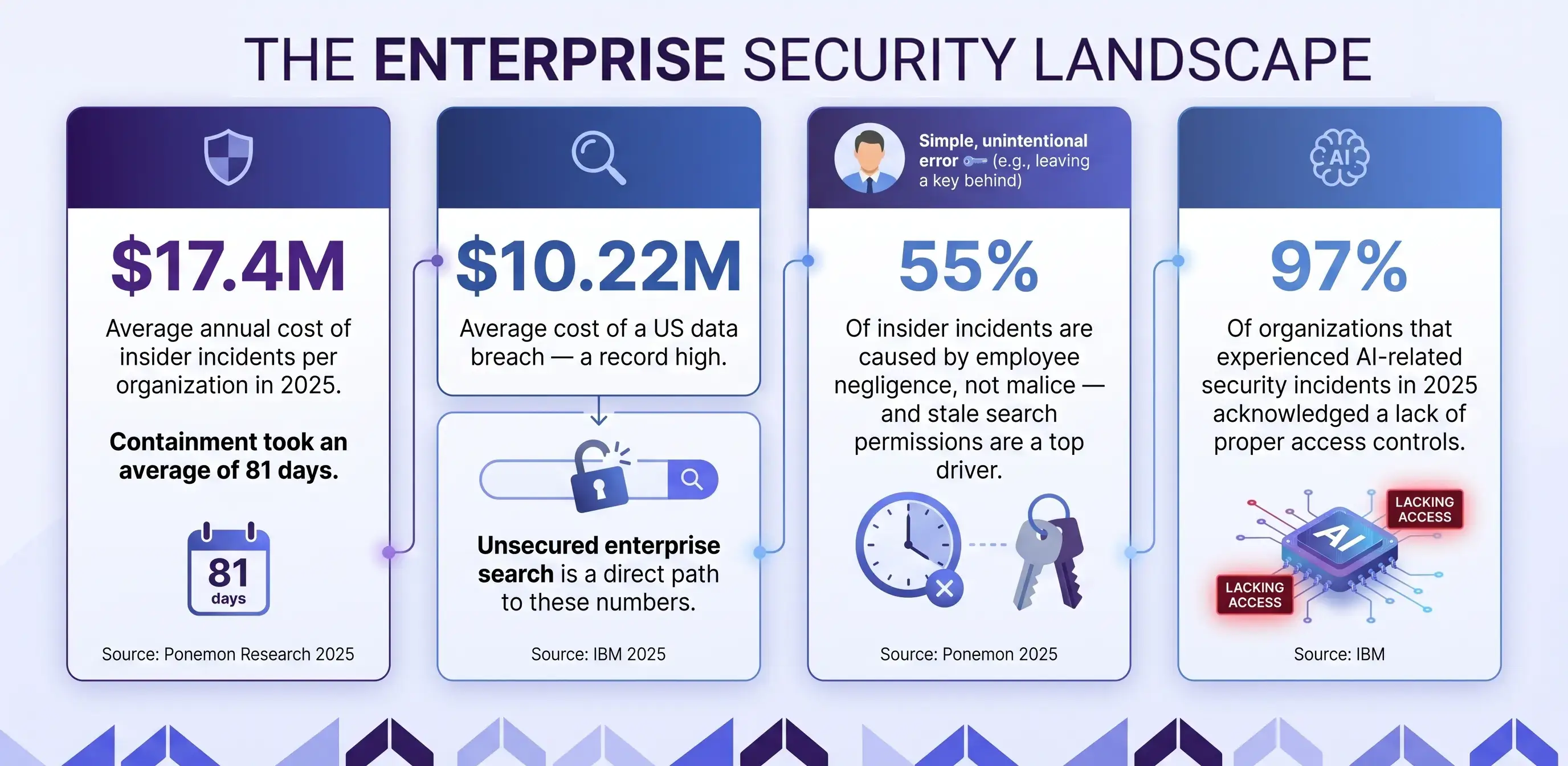
Why This Matters: Permission drift — the gap between who should have access and who actually does — is one of the most exploited insider threat vectors. Ponemon's 2025 research shows 55% of insider incidents are caused by negligence. Stale permissions are negligence baked into the system.
Example: A manufacturing company ran permission syncs nightly. An employee resigned on a Tuesday at 3 PM. By Wednesday morning, that employee had used the organization's enterprise search to download 14 confidential documents. The resignation was logged. The access revocation ran at midnight. The downloads happened at 6 PM.
Pro Tips to Implement This:
Switch to real-time or near-real-time permission syncing wherever possible
Connect your enterprise search platform directly to your IdP via SCIM or equivalent
Set automated alerts when permission sync fails for more than 30 minutes
Test offboarding scenarios: revoke access in the IdP and verify search access is immediately blocked
3. Apply the Principle of Least Privilege Across All Data Sources
Least privilege means every user and every system has access to the minimum data required to do their job. Nothing more. It sounds like a simple principle, but in practice it requires deliberate design, continuous enforcement, and regular review—especially in environments where data flows across multiple systems.
In enterprise search, this principle is violated constantly — and usually unintentionally. The very goal of search is to make information easy to discover, which often creates pressure to broaden access rather than restrict it. When a new data source gets connected, the path of least resistance is to grant broad access and narrow it down later. Later rarely comes.
Over time, this creates a compounding effect. Each overly permissive connector, each shortcut taken during integration, and each unreviewed access grant expands the searchable surface area of sensitive data. What starts as a small compromise for convenience gradually turns into a systemic exposure risk that is difficult to unwind.
The challenge is not just technical—it is behavioral. Teams prioritize speed of deployment over precision of access control. Deadlines get met, systems go live, and security assumptions remain untested. By the time an audit or incident reveals the gaps, the search index has already accumulated far more data than it should have exposed.
Why This Matters: Every data source connected to your search platform without proper least-privilege scoping expands your attack surface. IBM's research found that 97% of organizations that experienced AI-related security incidents in 2025 acknowledged a lack of proper access controls.
Example: A professional services firm connected enterprise search components to Google Drive using admin-level access so it could index everything without permission errors. Two years later, a routine audit found the search index included personal performance reviews, compensation records, and confidential partner communications that were never meant to be searchable.
Pro Tips to Implement This:
Document the minimum required permissions for each data source connector before connecting it
Use read-only connectors wherever possible — search indexing does not require write access
Audit each connector's access scope quarterly
Flag any connector using admin or elevated credentials for immediate review

4. Enable and Monitor Comprehensive Search Audit Logs
Every query matters. Every result click matters. Every export matters. Audit logging in enterprise search captures who searched for what, when, and what they accessed. It builds a detailed, chronological trail of behavior that can be analyzed, audited, and acted upon. Without it, you are flying blind during any incident investigation or compliance review, relying on assumptions instead of evidence.
In practice, audit logs are not just about post-incident forensics. They are a continuous visibility layer. They help you understand how your search system is actually being used—what people are looking for, which data is being accessed most frequently, and where unusual patterns begin to emerge. That visibility is what turns security from reactive to proactive.
Most organizations enable audit logging for their core systems — email, ERP, financial applications. Enterprise search is often overlooked. That is a critical gap, given how much sensitive content the search index touches.
The irony is that enterprise search often becomes the most concentrated access point to sensitive data, yet the least monitored. When logs are missing or incomplete, even a minor incident becomes difficult to investigate. You cannot trace who accessed what, you cannot reconstruct timelines, and you cannot confidently assess the impact. That lack of clarity slows down response, increases risk, and complicates compliance reporting.
Strong audit logging closes that gap. It ensures that every interaction with the search system is observable, traceable, and accountable—turning enterprise search from a blind spot into a controlled, measurable layer of your security posture.
Why This Matters: Containment of insider incidents takes an average of 81 days. Organizations with comprehensive audit logs contain incidents significantly faster because they can trace exactly which documents were accessed and by whom — without guesswork.
Example: A healthcare organization discovered unusual query patterns in monthly audit log reviews. One user had run 47 searches for patient record documents over a single weekend, from an IP address outside the building. The audit logs provided exact queries, timestamps, and accessed documents. HR and legal were engaged within 24 hours. Without logs, this pattern would never have been detected.
Pro Tips to Implement This:
Log all queries, result clicks, document previews, and exports — not just authentication events
Store audit logs in an immutable, tamper-resistant system separate from the search platform
Set automated alerts for high-volume searches, off-hours access, and bulk document access
Review audit logs monthly at minimum — and immediately after any security incident
5. Classify and Tag Content Before Indexing It
Search can only enforce security boundaries that are defined. If your content is not classified, your search platform has no way to know which documents are sensitive and which are public.
Content classification assigns a sensitivity label — Confidential, Restricted, Internal Use Only, Public — to every document before or at the point of indexing. These labels tell the search system how to handle each piece of content when returning results.
Why This Matters: Without classification, you cannot build meaningful access policies. You end up with permission structures that are either too broad or too fragile — and employees constantly encounter either over-exposure or unnecessary access errors.
Example: A consulting firm spent three months integrating enterprise search across eight data sources. After launch, employees frequently encountered results they should not have seen. The root cause was not a search configuration problem. No one had defined content sensitivity levels before indexing. Legal documents, client proposals, and internal guidelines were all treated the same way by the search layer.
Pro Tips to Implement This:
Define classification levels before connecting any data source, not after
Use your existing DLP tool to auto-classify documents where possible
Apply classification as metadata that travels with the document, not just as a folder permission
Build classification audits into your quarterly content governance cycle
6. Implement Zero Trust Principles in Search Infrastructure
Zero trust architecture is a security philosophy built on one rule: never trust, always verify. No user, no device, no system gets access by default — regardless of whether they are inside or outside the corporate network.
Applied to enterprise search, Zero Trust means the system continuously verifies identity, device health, and access policy at every query — not just at login. This matters because hybrid work, BYOD devices, contractor access, and compromised credentials make inside-network access just as risky as external access.
Why This Matters: Forrester reports that over 60% of global enterprises now deploy Zero Trust architecture in at least one business unit. Enterprise search platforms that do not align with Zero Trust create a specific gap that attackers can target — because search feels like a safe, internal tool.
Example: A technology company implemented Zero Trust access for their core applications but excluded enterprise search from the policy. During a security incident review, they found an attacker who had compromised an employee's credentials used the search platform specifically — because it required no re-authentication and had no device health check — to map document structures before targeting specific files elsewhere.
Pro Tips to Implement This:
Require MFA for search platform access, not just for SSO login
Enforce conditional access policies: if a device fails health checks, restrict or block search access
Segment search infrastructure so it is treated as a protected resource, not a shared utility
Review your Zero Trust framework's coverage to confirm enterprise search is included explicitly

7. Prevent Sensitive Data From Being Indexed in the First Place
Security controls are not a substitute for not indexing sensitive data unnecessarily. Not everything in your organization needs to be searchable by everyone. In fact, one of the most effective ways to reduce risk is to be intentional about what never enters the search layer in the first place.
Employee personal records, payroll data, M&A documents, legal litigation files, and board communications are examples of content categories that should either be excluded from search indexing entirely or restricted to an extremely narrow user group. These are not just “sensitive” in a general sense—they are high-impact data classes where even a minor exposure can lead to legal, financial, or reputational consequences.
The default behavior of most search connectors is broad indexing — narrowing the scope requires deliberate configuration. And that is where most organizations fall short. Indexing is often treated as a technical setup step rather than a governance decision. Connect the source, ingest the data, deal with permissions later. That mindset creates unnecessary risk from day one.
A better approach is to treat indexing as a filtering decision, not just a connectivity decision. Before any data source is connected, there should be a clear understanding of what should be searchable, what should be restricted, and what should be excluded entirely. This requires collaboration between security, legal, and data owners—not just the engineering team implementing the connector.
Over-indexing is rarely obvious in the moment. It becomes visible only when something goes wrong—when a document appears in search results that should never have been there. By then, the system has already exposed more than intended. Preventing that scenario is far easier than trying to contain it after the fact.
Why This Matters: Indexed content is exposed content. When controls fail — a permission misconfiguration, a sync delay, an API vulnerability — the content in the index is what gets exposed. The safest content in an index is the content that was never there.
Example: A retail company's enterprise search indexed their Confluence instance, including a space used by HR for performance improvement plans and termination documentation. An HR admin had incorrectly set the space permissions to 'All Confluence users.' Because the content was indexed, employees could search for their own names and surface documentation that was never meant to be visible.
Pro Tips to Implement This:
Create an explicit data exclusion list before any connector goes live
Review this list quarterly and update it as new sensitive content categories emerge
Mark sensitive locations (specific SharePoint libraries, Confluence spaces, drive folders) as index-excluded
Use DLP tags to automatically exclude documents above a certain sensitivity threshold from indexing
8. Protect Search Data With End-to-End Encryption
Enterprise search systems handle sensitive data in three states: at rest (stored in the search index), in transit (between the search engine and the user's browser), and in use (displayed as results). All three need encryption.
Most organizations handle in-transit encryption reasonably well. Encryption at rest is less consistently applied. Encryption on the search index itself — which contains extracted text from every document indexed — is often missing entirely.
Why This Matters: The search index is a copy of your content, not just a pointer to it. If your index is unencrypted, compromising the search infrastructure gives an attacker access to the text of every document you have indexed — without ever needing to touch the source systems.
Example: A cybersecurity company (ironically) discovered during a penetration test that their enterprise search index was stored unencrypted on a cloud storage volume. The tester accessed the full text of 11,000 indexed documents, including client security assessments, by exploiting a misconfigured storage access policy — without touching a single source system.
Pro Tips to Implement This:
Verify that your search platform encrypts the index at rest, not just the source documents
Enforce TLS 1.2 or higher for all search API endpoints — do not allow protocol downgrades
Rotate encryption keys on a defined schedule and document key management procedures
Confirm that any search result caches or temporary storage are also encrypted
9. Secure the Search API and External Integrations
Enterprise search increasingly connects to other tools — chat platforms, ticketing systems, AI assistants, workflows. Each integration creates an API surface that needs to be secured as carefully as the user-facing search interface.
An unsecured API endpoint on an enterprise search platform can allow an unauthenticated caller to query the search index or bypass user-level permissions by accessing the API directly rather than through the front-end application.
Why This Matters: Salt Security's 2024 research found that 94% of organizations experienced an API security problem in the previous 12 months. Enterprise search APIs are a soft target when not explicitly hardened — especially as AI integrations multiply the number of connected endpoints.
Example: A logistics platform integrated enterprise search with a customer-facing support portal. The API token used had no scope restrictions — it could query any index, not just the support documentation index. A security researcher discovered that the same token could be used to retrieve confidential shipment and pricing documents by calling the API directly.
Pro Tips to Implement This:
Use OAuth 2.0 scoped tokens for all search API integrations — never use master admin API keys
Enforce rate limiting on all search API endpoints to detect and block unusual query volumes
Audit all active API integrations quarterly and revoke tokens for integrations no longer in use
Log all API-level search activity separately from user-level search activity
10. Monitor Search Behavior for Anomalies and Insider Threats
Audit logs tell you what happened. Behavioral monitoring tells you what is about to happen. The difference is subtle but critical: one is retrospective visibility, the other is forward-looking detection that can interrupt risk before it escalates into an incident.
Search behavior monitoring uses baselines and anomaly detection to flag patterns that deviate from normal usage. These baselines are built over time, learning what typical access looks like for different roles, teams, and individuals. Once that baseline is established, even small deviations become meaningful signals rather than noise.
A user searching 80 documents in 10 minutes. Someone accessing files outside their department at 2 AM. A query pattern that looks like reconnaissance — searching for 'executive team,' 'salary,' 'acquisition,' and 'legal' in the same session. Individually, these actions may not trigger alarms. Together, and in the right context, they form a pattern that indicates intent.
The real value of behavioral monitoring lies in context. It does not just flag activity—it interprets it relative to what is normal for that user and that role. An engineer accessing technical documentation at midnight may be normal. The same engineer suddenly searching HR records or legal contracts is not. That contextual layer is what turns raw activity into actionable intelligence.
Over time, this creates an early warning system within your organization’s knowledge layer. Instead of discovering issues after data has been accessed or exfiltrated, you can detect and investigate suspicious behavior as it unfolds—often before any real damage is done.
Why This Matters: Traditional security monitoring watches the network perimeter and authentication events. Enterprise search sits inside that perimeter. Monitoring search behavior adds an internal detection layer that most organizations are missing — and that the data shows is critically needed.
Example: A financial services firm deployed anomaly detection on their enterprise search platform after connecting it to Salesforce. Within two weeks, the system flagged an account manager who had searched for and accessed 340 client records outside their assigned territory over a long weekend. Investigation found the employee had accepted a role at a competitor and was building a contact list before resigning. The firm pursued legal remedies because the behavior was detected and documented before departure.
Pro Tips to Implement This:
Define a baseline of normal search behavior for each role in your organization
Set alerts for volume anomalies, cross-department access, and off-hours search spikes
Integrate search behavior alerts with your SIEM for centralized incident response
Review flagged anomalies weekly — do not set alerts and forget them

11. Govern Access for AI-Powered Search Features
AI is changing what enterprise search can do. Natural language queries. Generative summaries. Contextual recommendations. These capabilities are genuinely useful. They also introduce security considerations that most governance frameworks have not caught up with.
The specific risk: AI-powered search features can synthesize information across documents in ways that surface sensitive data through inference, even when source documents are properly permissioned. A generative summary that aggregates 12 documents to answer one question can reveal conclusions that no single document makes clear.
Why This Matters: IBM's 2026 cybersecurity predictions flag AI agents and autonomous search features as a growing exposure problem. When AI acts across systems without clear audit trails, the accountability gap creates compliance and security risk. 13% of companies reported an AI-related security incident in 2025.
Example: A technology company deployed an AI-powered answer feature on their enterprise search platform. An employee without access to a classified project asked: 'What is the timeline for the Orion project?' The AI drew on publicly indexed project management metadata, email subjects mentioning Orion, and a mistakenly indexed calendar invite — and synthesized an accurate summary of a project the employee had no clearance to know about.
Pro Tips to Implement This:
Apply the same RBAC and permission rules to AI-generated summaries that apply to raw document results
Audit AI-generated outputs for sensitive content exposure before enabling generative features broadly
Restrict AI synthesis features to document sets the querying user is explicitly permitted to access
Log all AI-generated search outputs with the same rigor as direct document access logs
12. Build a Formal Security Governance Model for Enterprise Search
Every practice in this guide falls apart without ownership. Security governance means someone — or a defined group — is responsible for enterprise search security on an ongoing basis, not just at launch. It is not a one-time configuration exercise; it is a continuous discipline that evolves as your organization, data landscape, and tool stack grow.
In practice, this ownership needs to be explicit, accountable, and empowered. Someone must define policies, review access regularly, approve new integrations, and ensure that security controls are not just implemented—but actively maintained. Without that clarity, even well-designed systems degrade over time.
Without governance, permissions drift. Audit logs go unreviewed. New data source connectors get added without security review. Exceptions get introduced for convenience and never revisited. A search system that was reasonably secure at launch becomes a liability 18 months later.
This degradation is rarely sudden. It happens gradually—through small, seemingly harmless decisions that accumulate over time. A temporary access grant that becomes permanent. A connector added quickly to meet a deadline. A missed audit cycle. Individually minor, collectively significant.
Governance is what prevents that slow erosion. It ensures that enterprise search remains aligned with your security posture as the organization changes, rather than becoming an outdated snapshot of past assumptions.
Why This Matters: Most insider threats and data exposure incidents in search systems are not caused by sophisticated attacks. They are caused by accumulated configuration drift, unreviewed access grants, and the absence of anyone formally responsible for maintaining the security baseline.
Example: A healthcare organization appointed a dedicated enterprise search security owner after a compliance audit flagged 22 configuration gaps. The new owner ran quarterly security reviews, implemented a formal access request workflow for new data source integrations, and scheduled bi-annual penetration tests focused specifically on the search infrastructure. Within 12 months, all 22 gaps were closed. The platform passed its next compliance audit with no findings.
Pro Tips to Implement This:
Assign a named security owner for enterprise search, not just an IT team
Define a quarterly review checklist covering RBAC, audit logs, connector permissions, API tokens, and AI feature governance
Create a formal intake process for any new data source connection request
Run an annual red team or penetration test focused specifically on the search platform
Quick Reference: The Security Practices For Enterprise Search
# | Practice | Primary Risk Addressed | Review Frequency |
1 | Enforce RBAC at the search layer | Unauthorized document access | Quarterly |
2 | Sync permissions dynamically | Access drift and stale permissions | Continuous / alerting |
3 | Apply least privilege to connectors | Over-indexed sensitive content | Quarterly |
4 | Enable comprehensive audit logs | Undetected insider threats | Monthly + incident-triggered |
5 | Classify content before indexing | Boundary-less results | Quarterly |
6 | Implement Zero Trust for search | Compromised credential access | Annual framework review |
7 | Exclude sensitive data from indexing | Exposure when controls fail | Quarterly |
8 | End-to-end encryption | Infrastructure-level data theft | Annual key rotation |
9 | Secure APIs and integrations | API-based permission bypass | Quarterly |
10 | Monitor search behavior | Insider reconnaissance and exfiltration | Weekly review |
11 | Govern AI-powered search features | Inference-based data exposure | Before feature enablement |
12 | Build a governance model | Configuration drift over time | Quarterly + annual audit |
How ActionSync Approaches Enterprise Search Security
Security is not a feature you bolt onto search. It has to be designed in from the start.
ActionSync (actionsync.ai) is built around the principle that enterprise search must respect organizational boundaries — not just enable broad access. Its architecture enforces permissions at the query level, not just at the result display level. When an employee searches, the platform checks their permissions in real time against each connected data source before returning results.
This means sensitive documents are never surfaced to users without authorization — not because results are filtered after retrieval, but because unauthorized content is never retrieved in the first place. Combined with private deployment options and a data ownership model that keeps organizational data within defined boundaries, ActionSync is designed for organizations where security is a first-order requirement, not a configuration afterthought.
What this looks like in practice:
Real-time permission enforcement at query time (no post-filtering loopholes)
Native alignment with your IdP for dynamic access control and instant revocation
Source-level permission inheritance across all connected systems
Zero Trust–aligned access checks on every search interaction
Private deployment options (VPC / on-prem) for full data control
Encrypted indexing to protect extracted content, not just source files
Granular API access with scoped tokens and strict rate limiting
Comprehensive audit logs for every query, click, and export
AI outputs governed by the same permission layer as raw documents
Configurable data boundaries to exclude sensitive repositories from indexing
Why teams choose this approach:
Eliminates permission drift between systems and search
Reduces insider risk without slowing down access
Passes compliance audits with clear, traceable controls
Scales securely as new tools and data sources are added
Ready to see enterprise search that is both powerful and secure? Book a demo at actionsync.ai/book-demo

Frequently Asked Questions or FAQs
Q: What is the biggest security risk in enterprise search?
The most common risk is access misconfiguration — employees being able to search and retrieve documents they are not authorized to access. This happens when search permissions are not synced with source system permissions, when RBAC roles go stale after org changes, or when new data sources are connected without proper access scoping.
Q: How do audit logs help with enterprise search security?
Audit logs provide a forensic record of who searched for what, when, and what they accessed. This is critical for detecting insider threat patterns, satisfying compliance audits, and reconstructing the sequence of events during a security incident. Without them, you cannot effectively investigate anomalies.
Q: Is Zero Trust architecture necessary for enterprise search?
Not mandatory, but strongly recommended. Enterprise search aggregates access to sensitive content across many systems. Zero Trust principles — continuous verification, least privilege, device health checks — reduce the risk that a compromised credential can be used to access the search platform without additional barriers.
Q: How should organizations handle AI-generated summaries from a security standpoint?
AI-generated summaries should inherit the permission rules of the source documents they are derived from. A user should never receive an AI-synthesized answer that draws on documents they are not authorized to access directly. Govern AI features with the same rigor as raw document access.
Q: What compliance frameworks apply to enterprise search security?
Depending on your industry, enterprise search security touches GDPR, HIPAA, SOC 2, ISO 27001, and SOX. All of these frameworks require demonstrable access controls, audit trails, and data protection measures — each of which applies directly to how your search platform is configured and governed.
Q: How often should enterprise search security be reviewed?
At a minimum, quarterly for permission audits and access reviews. Annually for full penetration testing. And immediately after any organizational change that affects data access — new department creation, acquisitions, leadership transitions, or significant headcount changes. Additionally, you should ensure that your team follows these enterprise search best practices to stay ahead of the curve.
Conclusion
Enterprise search is one of the most powerful tools your organization can deploy. Whether you buy or build it in-house, it surely has its benefits. It removes friction, accelerates decisions, and gives employees access to the knowledge they need to do their best work.
It is also one of the most consequential systems from a security standpoint, because it touches everything.
The practices in this guide are not abstract security theater. They are the concrete, practical steps that separate organizations that use enterprise search confidently from those that discover its security gaps during a breach investigation.
Done right, enterprise search security becomes invisible. Employees find what they need. Sensitive content stays protected. And your organization can invest in the capability with confidence — knowing the boundaries hold.